Embodied robot
CARROT GOOSE
Exploring physical expression for an AI companion.
Project overview
When does a hug gesture feel like a response to the person, rather than an action played beside the dialogue? Carrot Goose explores this question through a physical extension of my companion project.
Using TonyPi, I designed and tested head-and-arm sequences, hand-following and short voice cues connected to a web conversation. The Carrot Goose project includes a TonyPi robot interaction system and a browser-based motion workbench for preparing and revising movements before physical rehearsal.
Developer demonstration
Three moments of physical expression
The demonstration explores an attention shift, a playful reply and an invitation to hug.
01 / System architecture
Connecting conversation to physical action
The web companion generates dialogue through an LLM; the action layer handles movement sequences. A local controller executes commands within configured limits and returns feedback.
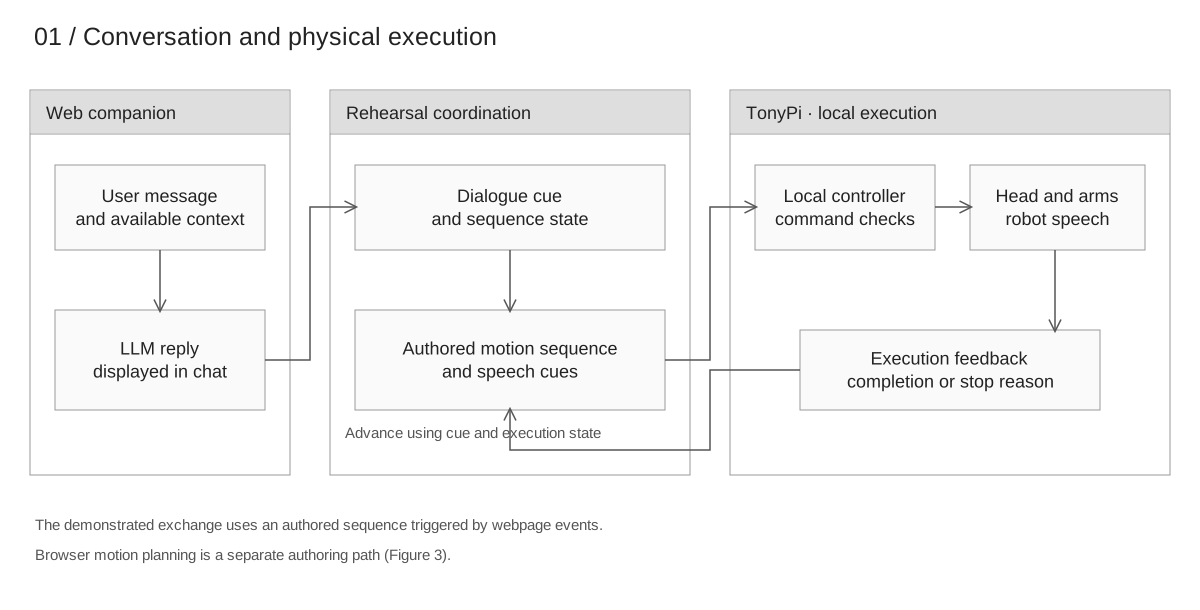
LLM-assisted motion authoring is a separate workflow: language requests produce editable sequence data for review.
02 / Character expression
Expressive performance
Drawing on game performance planning, I connect dialogue to a reusable action library. In the hug sequence, the robot faces the user and raises an arm before opening both arms as an invitation.
The design question is whether this lead-in makes the gesture feel directed towards the user.
Action library and performance score
| Action | Movement | Control |
|---|---|---|
| XJ-A01 · Hand tracking | Adjust head direction to follow the hand; suspend updates if the target is lost. | Head · PWM 1 and 2 |
| XJ-A02 · Face and hold | Exit tracking, turn towards the user and hold. | Head · PWM 1 and 2 |
| XJ-A03 · Head turn and pause | Turn the head slightly to one side, with a small downward movement, then pause. | Head · PWM 1 and 2 |
| XJ-A04 · Shoulder lift | Lightly raise the shoulder–arm assembly, then pause. | Both arms · bus servos |
| XJ-A05 · Nod | Lower the head, then lift it back; repeat when required. | Head · PWM 1 |
| XJ-A06 · Raise arm | Raise the right arm and hold for the next action. | Right arm · bus servos |
| XJ-A07 · Hug and release | Prepare both arms, open or reach forward, pause, then lower and draw them back. | Both arms · bus servos |
| XJ-A08 · Shoulder–arm return | Lower the raised shoulder–arm assembly to its resting posture. | Both arms · bus servos |
| XJ-A09 · Head turn | Turn the head towards one side. | Head · PWM 2 |
| XJ-A10 · Head return | Turn the head back towards the user. | Head · PWM 2 |
The XJ-A series identifies body and head actions in this motion-library configuration table.
| Shot | Dialogue | Actions |
|---|---|---|
| 01 | User: moves a hand. | XJ-A01 |
| 02 | Robot voice: “Ah?” | XJ-A02Stop tracking before turning. |
| 03 | User: “Are you happy today?” | XJ-A03 |
| 04 | Text: “Not telling.” Robot voice: not played. | XJ-A04 → XJ-A08 → XJ-A09 → XJ-A10 → XJ-A05Pause after the shoulder lift. |
| 05 | Robot voice: “Hey.” | XJ-A02 |
| 06 | User: “What is it?” | XJ-A06Hold the arm for the next action. |
| 07 | Text: “Just wanted to give you a hug. Hope you’re having a good day, too.” | XJ-A07 |
03 / Motion authoring
A virtual workbench for robot rehearsal
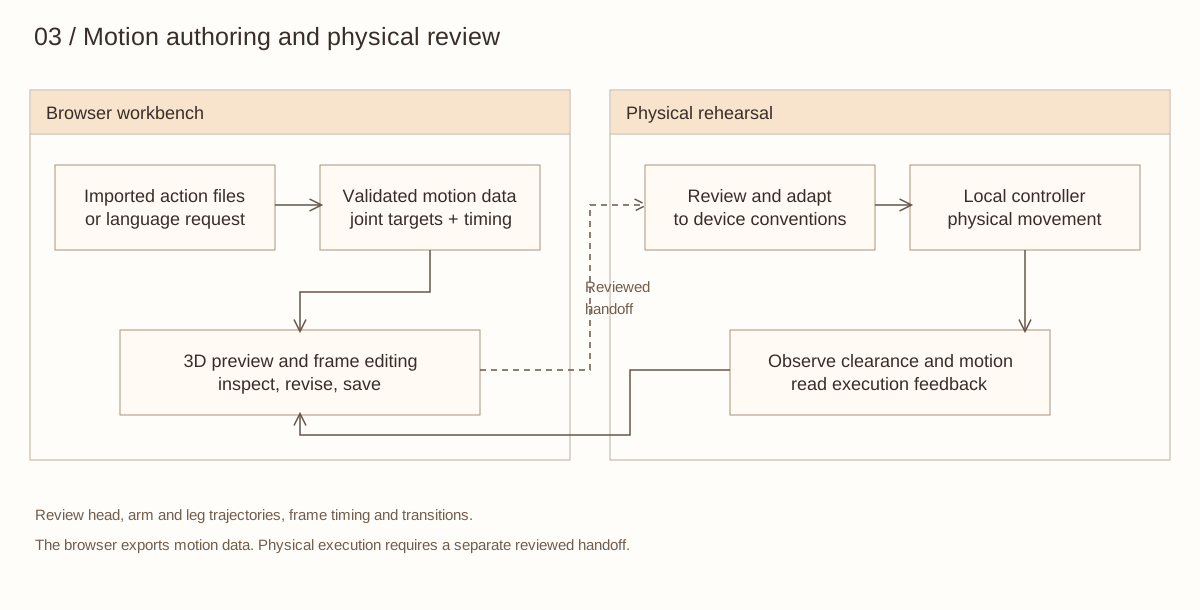
I built the motion workbench in Three.js with AI-assisted coding. It lets me inspect poses and adjust their timing before physical rehearsal. The repository also includes an Unreal Engine preview, with editor scripts that generate a simplified robot scene and Level Sequences.
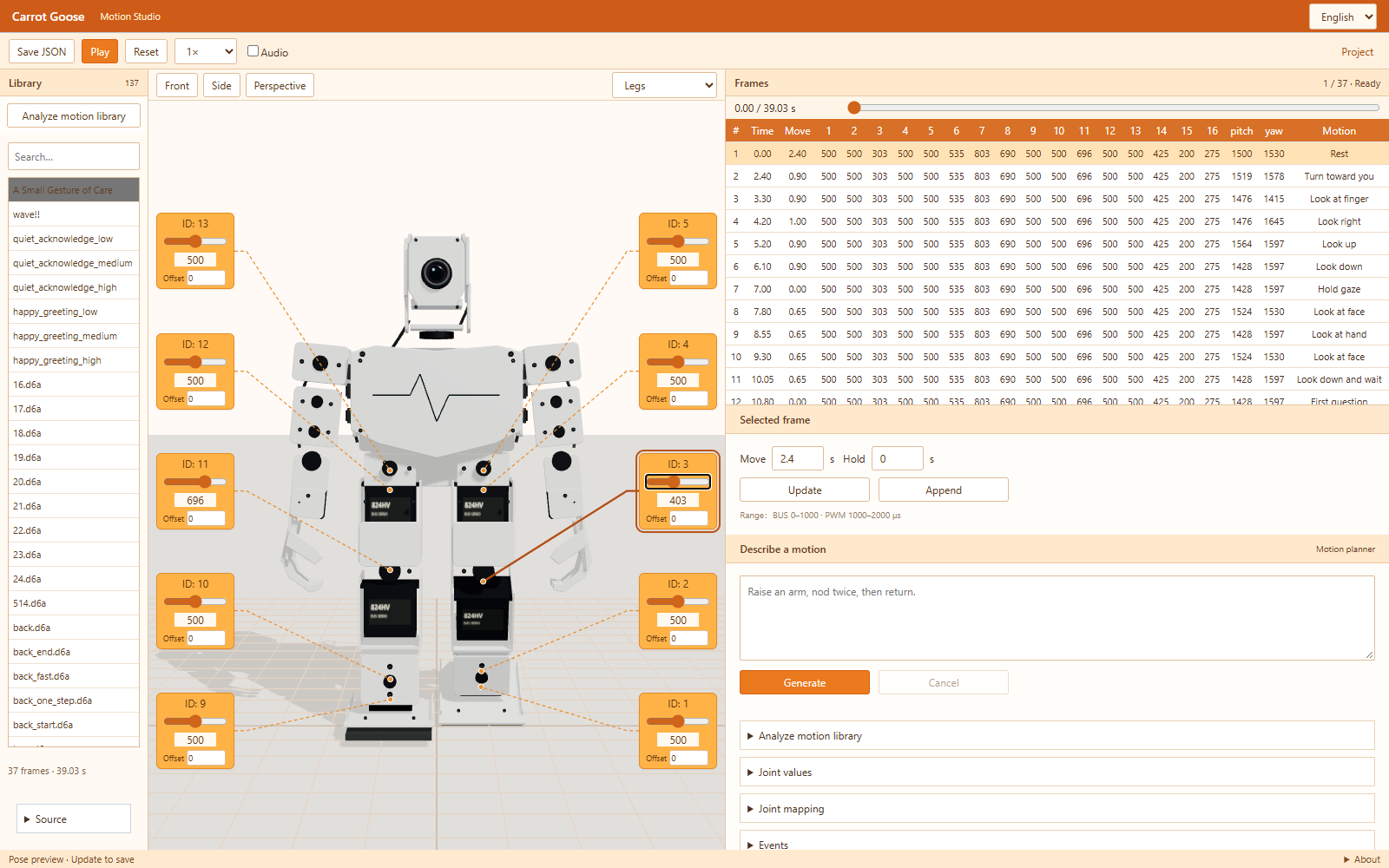
Open the motion workbench ↗ · View the project on GitHub ↗ · View the Unreal Engine preview ↗
Edit and preview
Change joint targets and frame durations, scrub the timeline and play the sequence. Controls move the model immediately; a separate offset field supports model calibration.
Build motion variations
Import TonyPi action files, save edited versions and export sequence data. Language requests can compose actions or change their amplitude and speed.
The workbench prepares editable motion sequences; the local controller handles physical execution and feedback.
Further research
When does a gesture feel responsive?
A proposed study would compare the same arm invitation beginning before or after the displayed reply. Only the gesture’s timing would vary. Participants would experience both conditions in counterbalanced order and describe whether the gesture felt directed towards them and responsive to the exchange.
I would compare playback timing with participants’ accounts of how responsive the gesture felt. A later study could compare live hand tracking with an authored attention sequence.